This article explains how to enroll devices using the Zwave Long-Range protocol. This will give better range, battery life and connectivity between the hub and the devices.
Long-range hubs include the Qolsys IQ Hub 4/5 and the alarm.com proton hub. You need the installer app to perform this operation, contact [email protected] if this is something you need to be setup for.
Steps:
1) Find the unit in mobiletech. Best way to search for the unit is by going to Customers from lower menu, then search for Customer. Then enter the unit number in the "System description" field. You can also use the address field too. Click on the unit when it comes up.
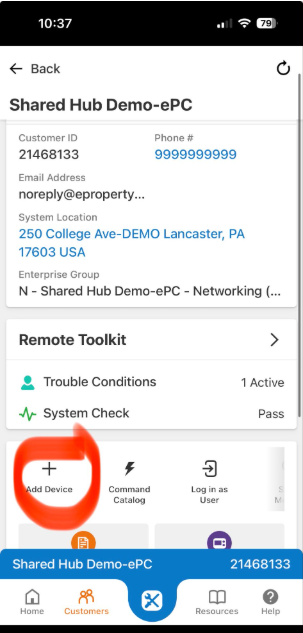
2) When in unit, scroll down and click "Add Device"
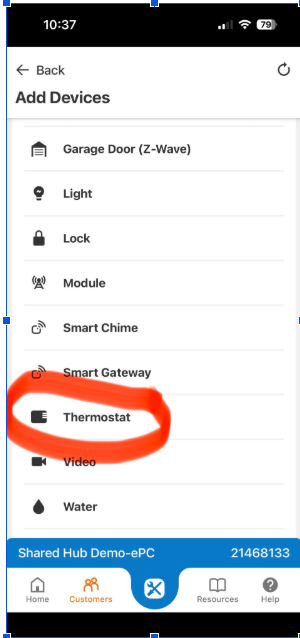
3) Select Lock or Thermostat (provided they are long-range enabled devices - T25 thermostat, Kwikset locks, Sensors)
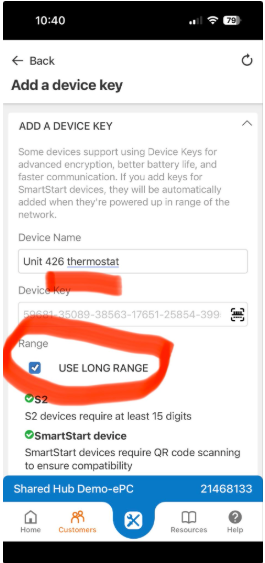
4) Name the device properly and select the Long-Range check box. Note: Firmware of the Qolsys IQ4 panels need to be 4.6.1 and above to have this as an option.
5) Devices will automatically pair after a few minutes, or you can power-up or add the device following the normal pairing process.