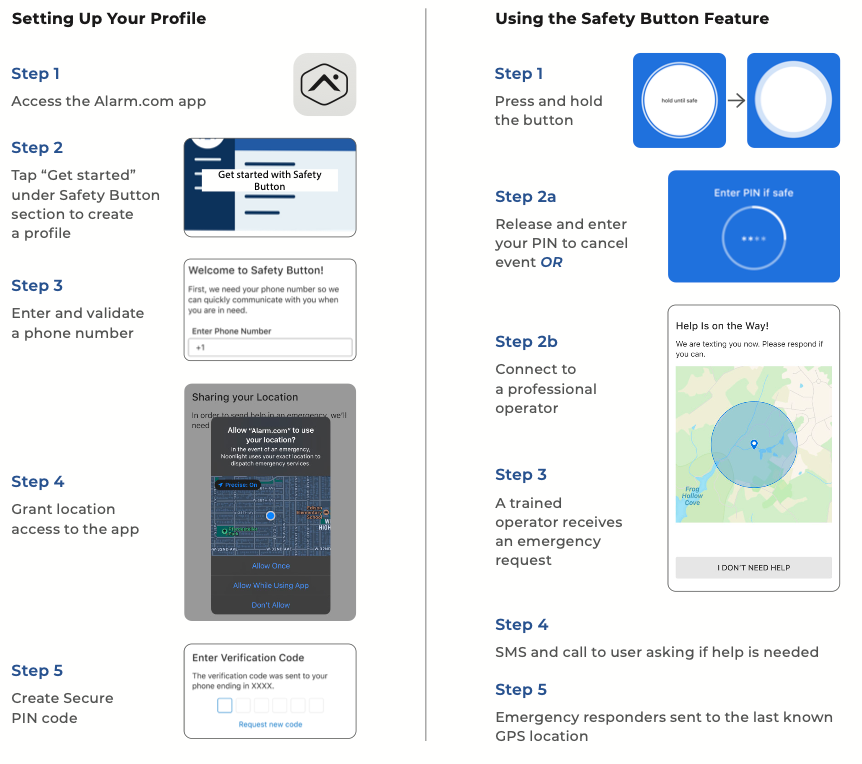
This article explains how to setup the resident safety button in the App:
Setting up resident safety button
Articles in this category
- Editing Enterprise Group Login Template to Allow Residents to Create Guest codes
- How to Create a Resident App Login (dedicated hub for unit)
- How to Create a Resident App login (shared hub scenario)
- How a Resident can setup a temporary Guest Code
- What to do when a hub is offline or showing "radio not responding"
- How to Create a Resident User Code at the Enterprise level
- What to do when a thermostat is offline or showing "malfunction"
- How to Combine Two App Logins together (for a unit door and a common door)
- How to Create User Codes for Systems with Access Control Doors plus Smart Locks
- How to Create Building Access Users in MDU systems
- How to manually process a resident move-in (no PMS integration)
- Creating an Employee All-Access User for systems with locks and building access control
- How to change a user code in PointCentral System
- How to add an enterprise App login to a new group
- How to download video clips on the SVR
- How to Create Enterprise Notifications for Low Batteries and Unplugged Hubs
- Create an Enterprise App login for an All-Access user
- What to do when a lock is in malfunction
- What to do when a lock is offline or in malfunction
- Recommended process for property managers to load and verify codes for new residents on systems with locks and building door control
- How to find the backup code for a resident
- How to setup Enterprise Thermostat Rules / Templates
- How to create Enterprise Battery Report
- How to setup Enterprise Activity Reports
- How to move units between Enterprise Groups (Occupied and Vacant)
- How to manually process a resident move-out
- How to manually process residents for move-in (with PMS automation enabled)
- How to setup a unit for unattended showings / self-guided tours
- Creating a resident unit login for systems with building access control
- Setting up a guest code
- Different move-in options for residents (when PMS integration enabled)
- Create guest codes for buildings with common doors
- Create App login for shared hub with unit lock and building access control
- How to add a mobile credential to a User
- How a resident can access the access control system through the App
- How to resolve a severe heating/cooling alert
- How to search for lock mechanical issues
- Creating a guest code for building access thru an individual system login
- Self-management of Resident User Codes
- Resident video doorbell pairing
- Resident Video Doorbell pairing (including wifi setup)
- How to add ADC-T40k-HQ to wifi
- New PointCentral Community Dashboard
- Setting up Liftmaster MyQ wifi garage controller with PointCentral
- Setting up garage door alerts
- Central Station Monitoring information and considerations
- How to create an arming schedule for a security system
- How to setup alerts for self-guided tours
- How to create a video health report
- How to enable preloaded codes